AWS HealthLake : The potential game-changer for Healthcare cloud

Introduction: I am always amazed to see the number of AWS Services in the market. Each day there are 100s of features that get released and there are several new products that get launched every month. While I was glancing through the news, I came across a very interesting service that caught my attention — AWS HealthLake! It got me curious and here we are — with another blog on it
Overview: In the modern healthcare industry, data is abundant. From patient records and clinical notes to medical images, data holds immense potential to enhance patient care, facilitate research, and improve health outcomes. However, the challenge lies in unlocking this potential, as this data often exists in siloed systems that hinder comprehensive analysis and utilization.
AWS HealthLake emerges as a solution to this problem. It’s a HIPAA-eligible service tailor-made to address the unique needs of healthcare organizations, providing a secure, compliant, and insightful platform for managing health data.
HealthLake functions essentially as a secure data lake, specifically designed for healthcare data. It employs the Fast Healthcare Interoperability Resources (FHIR) standard, a universally accepted format for exchanging healthcare information electronically. This allows for the ingestion of data from a wide array of sources, transforming it into a consistent, queryable structure, regardless of its original format.
Here’s why AWS HealthLake is a game-changer for healthcare organizations:
Unified Patient View: HealthLake assembles all patient data, including medical history, medications, and allergies, into a single, centralized location. This holistic view equips clinicians with the comprehensive information needed to make well-informed decisions, enhancing patient care.
Analytics-Driven Insights: Once your data is structured, HealthLake enables large-scale analysis. Use Amazon QuickSight for interactive dashboards, or create custom machine learning models with Amazon SageMaker to identify hidden trends and patterns within your data.
Security and Compliance: HealthLake is designed with robust security features and HIPAA eligibility, ensuring that sensitive healthcare data is always protected.
Starting with HealthLake is straightforward. The platform allows for easy data import, and its built-in natural language processing (NLP) capabilities can extract valuable insights from unstructured text. Moreover, you can leverage the wider AWS ecosystem for further analysis.
Whether you’re a large hospital network or a small clinic, AWS HealthLake can transform your healthcare data into actionable insights, leading to enhanced patient care and improved health outcomes. It’s a testament to the transformative power of data in the healthcare industry.
Getting started with AWS HealthLake
In this section of the blog, I am going to talk about getting started with AWS HealthLake. I’ll create a Data Store and import data from S3
Step 1: Go to AWS HealthLake Console and create a DataStore
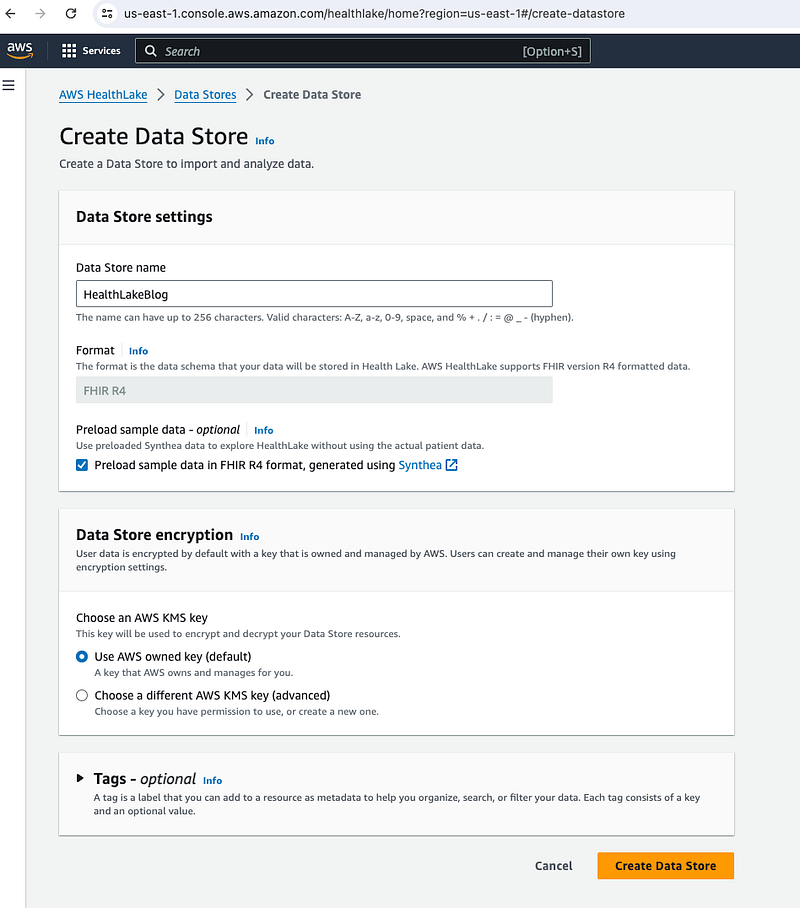
In the above example, I’ve checked on Box for Pre-log sample data using synthea (later one I’ll import data from S3). If you wish to use your own data, you can uncheck that box.
User also gets an option to use AWS Managed Key for encryption or create their own
Step 2: Import existing Data Set
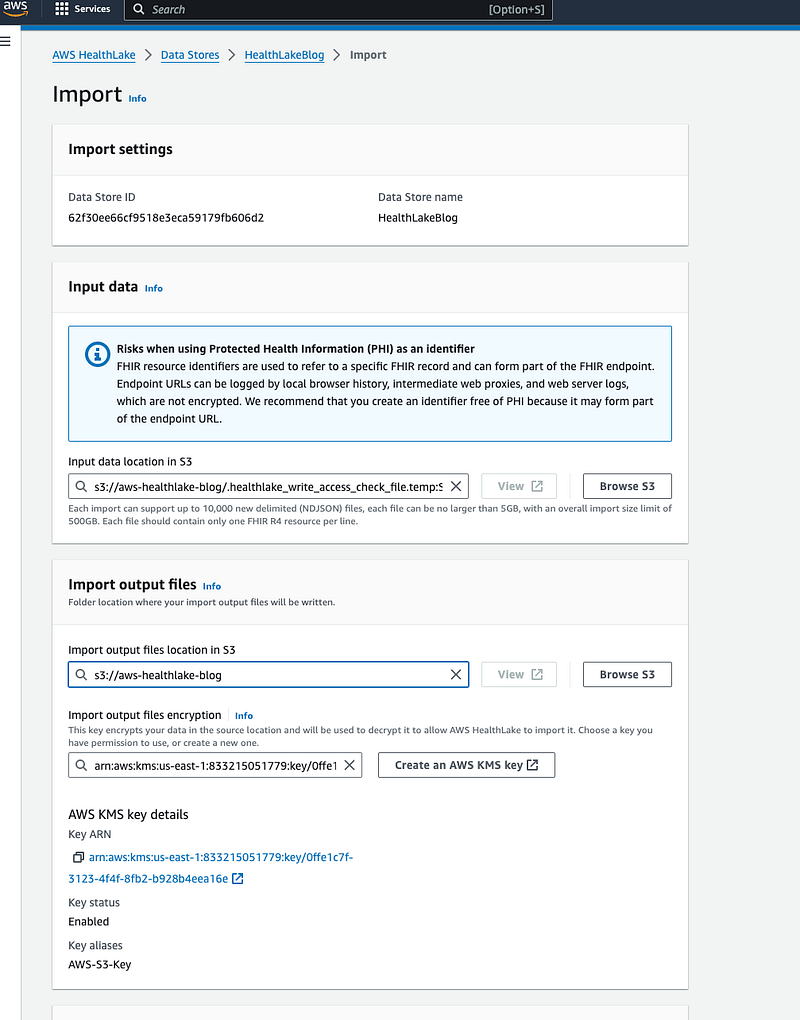
- Data Store ID and name: This section displays the ID and name of the data store you’re importing data into.
- Input data location: This section specifies the location of the data you want to import. In the screenshot, the data is located in an S3 bucket at the URI.
- Import output files location: This section specifies the S3 bucket location where the output files generated by the import process will be written.
- Import output files encryption: This section specifies the KMS key that will be used to decrypt the data upon import.
PS — For the above step, you’ll need to create IAM role and AWS KMS key inorder to successfully import all the data from S3
Step 3: Run a query
Once user data is successfully imported from S3 bucket. PLease note that HealthCare Data is sensitive and there are compliances and policies that needs to be adhered. The data in my case has been simulated using https://synthetichealth.github.io/synthea/
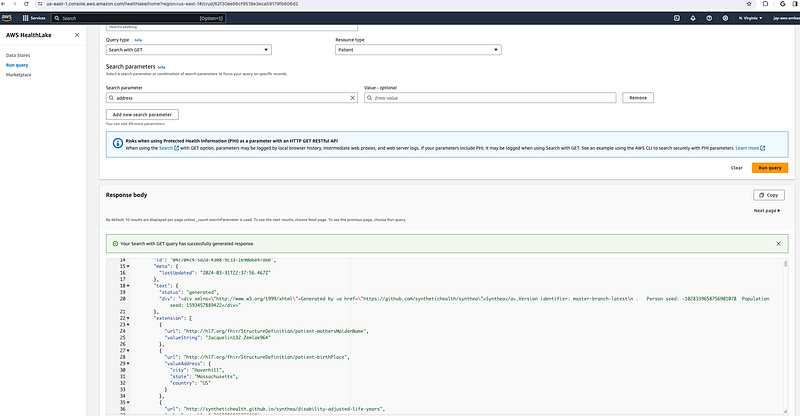
Attached is an example where I have searched for a resource type (Patient) & search parameter (address).
The query type offers you the following options
Search with GET : Retrives Data from the data set
Create: Adds a new data entry, like a POST operation
Read: Fetches existing data, like a GET operation
Update: Modifies existing data, just like a PUT operation
Delete: Removes data entry
The use cases of AWS HealthLake are many, comment down your favorite usecase/architecture below!